Deploying a high-signal Wazuh + PiHole Defense Alerting System is one of the most effective ways to establish a reliable home Security Operations Center (SOC) without the enterprise noise. When setting up a homelab SIEM, Wazuh is often the first tool recommended. It is a fantastic enterprise-grade, open-source security platform that combines log management, file integrity monitoring, and endpoint detection into a single universal agent.
But if you simply drop a default Wazuh installation onto your home network, you will quickly encounter a classic Security Operations Center problem: alert fatigue. Out of the box, Wazuh is geared to analyze enterprise behavior. In a residential environment filled with smart TVs, constant DHCP renewals, gaming consoles, and chatty local network broadcasts, default rules either flood your inbox with noise or miss the contextual anomalies unique to your household.
If you want a SIEM that actually protects your home without turning into a secondary full-time job, you need to understand that Wazuh alone is not enough. You need highly tailored, high-signal rules designed to trigger email alerts for events so rare and specific that you will actually get up from your couch to triage them.
By combining host telemetry with external network context, such as Pi-hole DNS data, you can transform a noisy enterprise log aggregator into an actionable, quiet home tripwire. Check out our GitHub repo with these rules and more, that you can implement right away.
The Philosophy of Low-Noise Home Detections
An enterprise SOC relies on continuous monitoring dashboards and teams shifting through thousands of medium-severity alerts. At home, you don’t have a team. Your primary security interface is your email inbox.
To keep your sanity, your custom detection logic should adhere to three core design goals:
- Alert exclusively on rare behavior: Detections must target activities that have zero business happening on a standard home network.
- Prioritize absolute simplicity: Rely on straightforward, explainable logic over convoluted, fragile multi-event correlations.
- Context-rich email delivery: If an alert triggers, the notification email must contain enough actionable metadata, such as the specific process name, destination IP, and domain, to let you decide on a triage path immediately.
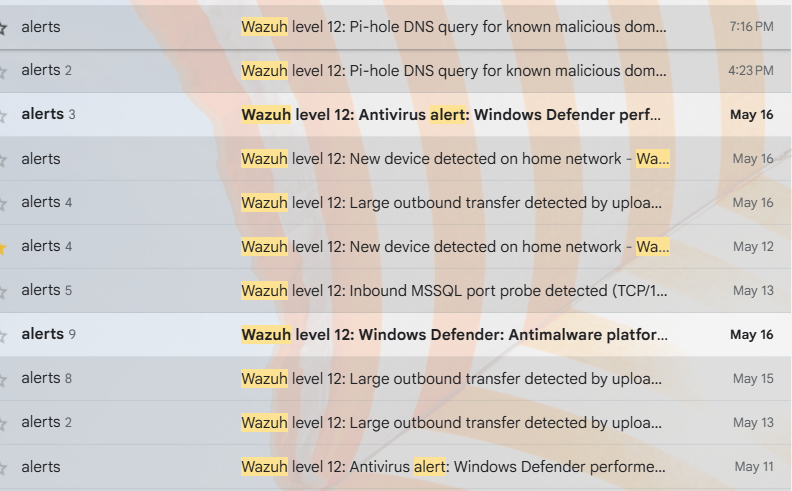
Actionable Tripwires for the Home
To shift Wazuh from a generic monitor into a high-signal security tool, implement these targeted detections.
1. Catching Data Exfiltration: Large Outbound Transfers
Malware staging, accidental cloud sync configurations, or a compromised machine backing up internal data to an untrusted external server all share a common footprint: unexpected, massive outbound data spikes.
A highly effective threshold for a household is tracking 1 GiB of outbound data over a rolling 30-minute window. While an automated rule can flag the raw bandwidth anomaly, the default log entry lacks context. To fix this, pair the detection with a host-side script on Windows endpoints to enrich the log telemetry.
When the threshold is crossed, the script captures local network states and appends vital data points directly into the event payload:
- The exact parent and child process originating the traffic.
- The destination IP and remote port.
- The active local DNS cache name alongside the external PTR record.
Seeing git.exe pushing data to a known corporate repository means you can ignore the email. Seeing an unknown binary in AppData\Local\Temp pushing data to an unclassified foreign IP means it is time to isolate the host.
2. Setting Up an Internal Tripwire: MSSQL Port Probes
Unless you are actively hosting enterprise database software at home, internal devices should never look for a Microsoft SQL Server database. This makes TCP port 1433 the perfect internal honeypot tripwire.
XML
<group name="local,firewall,">
  <rule id="100015" level="10">
    <if_sid>5716</if_sid>
    <field name="dest_port">1433</field>
    <description>High Signal: Unauthorized MSSQL Port Probe Detected</description>
    <mitre>
      <id>T1046</id>
    </mitre>
  </rule>
</group>
You can collect these logs seamlessly across your entire environment:
- On Linux hosts: Configure
iptablesorufwto log dropped connections targeting port 1433. - On Windows hosts: Enable logging for dropped packets within the Windows Defender Firewall configuration and ingest those logs via the Wazuh agent.
Because no benign software on your network should randomly probe 1433, any single hit on this rule represents lateral movement tracking, a misconfigured network scanner, or malware searching for a foothold.
Deploying the Wazuh + PiHole Defense Alerting System
Wazuh excels at host-level context, but it lacks full visibility into external network requests. By pointing your local DNS traffic to a Pi-hole, you capture every single outbound query made by your smart TVs, IoT devices, and personal computers. Integrating Pi-hole with Wazuh creates an incredibly robust detection mechanism.
By forwarding the Pi-hole query log (/var/log/pihole/pihole.log) to your central Wazuh manager using the local agent configuration, you can compare network queries against custom Constant DataBase (CDB) lists.
XML
<localfile>
  <location>/var/log/pihole/pihole.log</location>
  <log_format>syslog</log_format>
</localfile>
When a device requests a domain that matches a high-severity threat list or a known command-and-control (C2) server, the Wazuh + PiHole Defense Alerting System intercepts the syslog event and elevates it to a critical alert. This flags compromised endpoints, even if those endpoints are locked-down IoT devices where you cannot install a native Wazuh agent. To expedite this integration, you can cross-reference the deployment configurations found in the Wazuh-Pihole Quickstart guide.
Crafting Clean, Context-Rich Alert Emails
Receiving a raw JSON dump or a generic message stating “Rule 100015 triggered” guarantees you will start ignoring your SIEM. The final step in building a sustainable home deployment is formatting the email alert so that it is genuinely useful.
When configuring the Wazuh manager’s email alerts (ossec.conf), pay attention to these operational habits:
- Defang dangerous strings: Ensure that your alert script automatically defangs malicious IP addresses and domains (e.g., transforming
malicious.comtomalicious[.]com) before sending the email to prevent accidental clicks while triaging from your phone. - Map local infrastructure: Maintain a simple local text alias file on your manager. Use it to translate raw local IP addresses or random hostnames into friendly names within the email body (e.g., mapping
192.168.1.45toMac Laptopor192.168.1.12toLiving Room Smart TV). - Keep details explicit: Every email should immediately structure the affected agent name, the exact rule description, a clean timestamp, and the specific event details on separate, easy-to-read lines.
Operational Reality Checks
Deploying a custom SIEM architecture at home comes with several distinct structural constraints that differ from corporate environments:
- Telemetry limits: Wazuh provides deep host telemetry, but it does not perform full packet capture (PCU). Network Address Translation (NAT), local DNS caching, short-lived connections, and encrypted application protocols (like TLS and DoH) naturally restrict what your logs can see.
- Manager Stability: Always map your endpoint agents to a stable internal DNS name for the Wazuh manager rather than a raw IP address. If your local DHCP server shifts infrastructure addresses around, your endpoints will not lose their connection to the SIEM.
- Scheduled Tasks over Remote Commands: For security hardening, keep remote command execution disabled within your endpoint agents’
local_internal_options.conf. If you need to regularly update local scripts or enrich tools, managing them via native cron jobs or Windows Scheduled Tasks is a far safer approach. - Tune and Test: Before you trust your email alerts, explicitly test them with known, benign simulation behavior. Trigger a large file download or use a secondary machine to run a directed port probe against port 1433 to confirm the alert routes correctly and contains the exact context you need.
The ultimate objective of running a home SIEM is not to construct a flawless, corporate-grade Security Operations Center in your spare bedroom. The true goal of a custom Wazuh + PiHole Defense Alerting System is to illuminate rare, suspicious events just clearly enough that you can spot them, instantly understand their impact from a brief email notification, and quickly decide whether they warrant a closer look. For more strategies on identifying infrastructure vulnerabilities and defensive design, check out our breakdown of the Robinhood email infrastructure takeover attack or explore our technical thoughts on tackling the OSCP certification path.