While their systems were not technically breached, on 4/27/2026, Robinhood sent out a swath of phishing emails, being fully signed from their own infrastructure.
While phishing emails are not generally interesting, this one is, as the attacker used a novel technique to get these to deliver to the end user, bypassing spam detection, and utilizing a novel Robinhood email infrastructure takeover.
TL;DR – At a Glance
Vector: HTML Injection via device metadata.
Routing: Gmail “dot trick” to bypass duplicate email checks.
Auth: 100% valid SPF, DKIM, and DMARC (sent via legitimate SendGrid tenant).
Payload: Malicious HTML rendered inside an official Robinhood notification
The Attack Hook: The Gmail “Dot Trick”
The campaign began by targeting existing Robinhood users through a known quirk in Gmail’s routing. Gmail ignores periods in the local part of an email address. For example, [email protected] and [email protected] deliver to the same inbox.
By creating new Robinhood accounts using a dotted version of a target’s email, the attackers were able to:
- Avoid Duplicate Email Checks: The system saw a “new” email address.
- Ensure Delivery: The resulting system notifications were delivered to the original user’s primary inbox.
The Technical Exploit: HTML Injection via Metadata
The “magic” of this attack wasn’t just in the delivery, but in the content. The attackers exploited a lack of input sanitization in the account creation flow.
- The Vector: During signup, attackers sent malicious HTML payloads within browser or device metadata fields (like the User-Agent or Device Name).
- The Vulnerability: Robinhood’s backend appears to have stored this unsanitized string and later injected it directly into an automated “New Login” or “Account Change” email template.
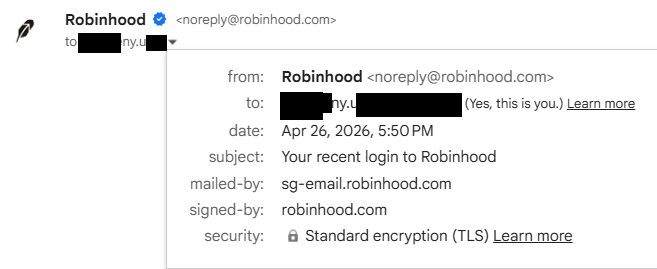
- The Result: Because the email was generated by Robinhood’s actual servers and sent via their SendGrid tenant, it arrived with a verified Gmail checkmark and passed all SPF, DKIM, and DMARC checks.
See below for a sample of the headers in the email I received:
Delivered-To: ...
ARC-Authentication-Results: i=1; mx.google.com;
       dkim=pass [email protected] header.s=s1 header.b=zqFdtxhI;
       dkim=pass [email protected] header.s=smtpapi header.b=N9lQxaaj;
       spf=pass (google.com: domain of [email protected] designates 50.31.40.75 as permitted sender) smtp.mailfrom="[email protected]";
       dmarc=pass (p=QUARANTINE sp=QUARANTINE dis=NONE) header.from=robinhood.com
Return-Path: <[email protected]>
Received: from o3.email.robinhood.com (o3.email.robinhood.com. [50.31.40.75])
        by mx.google.com with ESMTPS id 6a1803df08f44-8b02aef8544si337460546d6.465.2026.04.26.17.50.16
        for <[email protected]>
        (version=TLS1_3 cipher=TLS_AES_128_GCM_SHA256 bits=128/128);
        Sun, 26 Apr 2026 17:50:16 -0700 (PDT)
Received-SPF: pass (google.com: domain of [email protected] designates 50.31.40.75 as permitted sender) client-ip=50.31.40.75;
Authentication-Results: mx.google.com;
       dkim=pass [email protected] header.s=s1 header.b=zqFdtxhI;
       dkim=pass [email protected] header.s=smtpapi header.b=N9lQxaaj;
       spf=pass (google.com: domain of [email protected] designates 50.31.40.75 as permitted sender) smtp.mailfrom="[email protected]";
       dmarc=pass (p=QUARANTINE sp=QUARANTINE dis=NONE) header.from=robinhood.com
From: Robinhood <[email protected]>
Message-ID: <QBGzyCaaS2O9EaWBzFlKGA@geopod-ismtpd-2>
Subject: Your recent login to Robinhood
Feedback-ID: 751av2Nggjb0pZfGeCefTv::REGULATORY_REQUIRED:postoffice
...
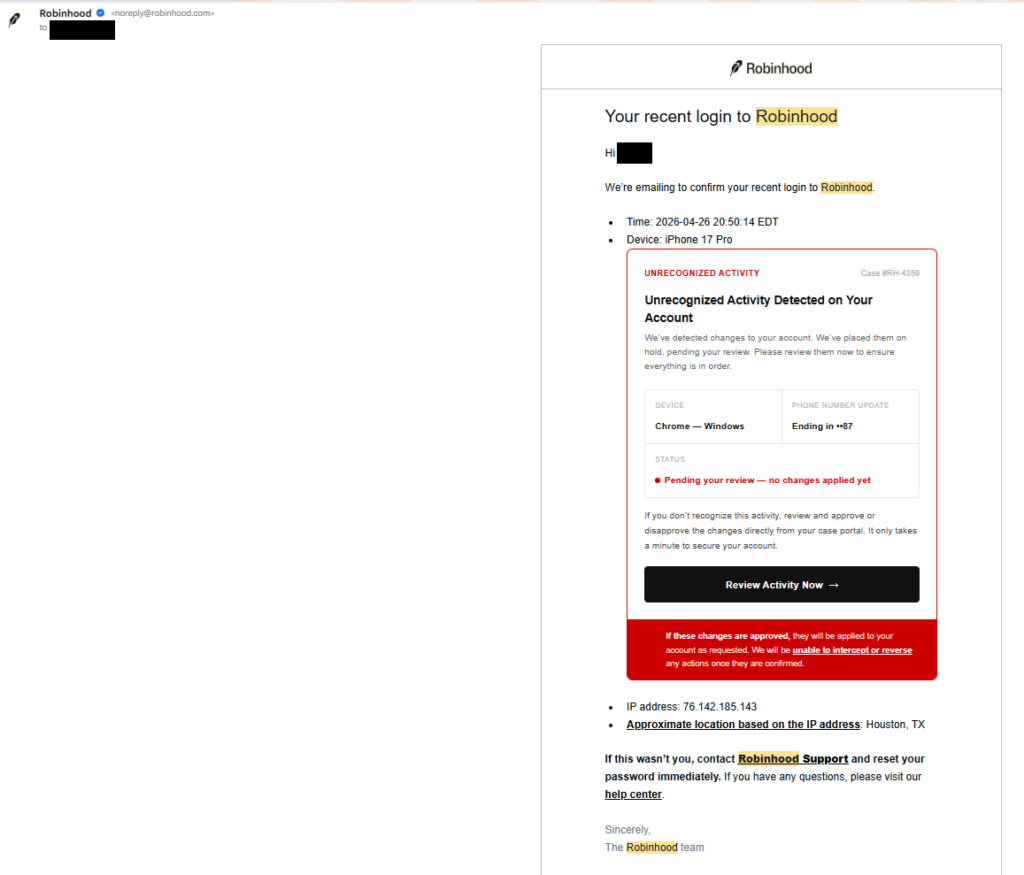
The Phishing Email
The Robinhood Follow-up
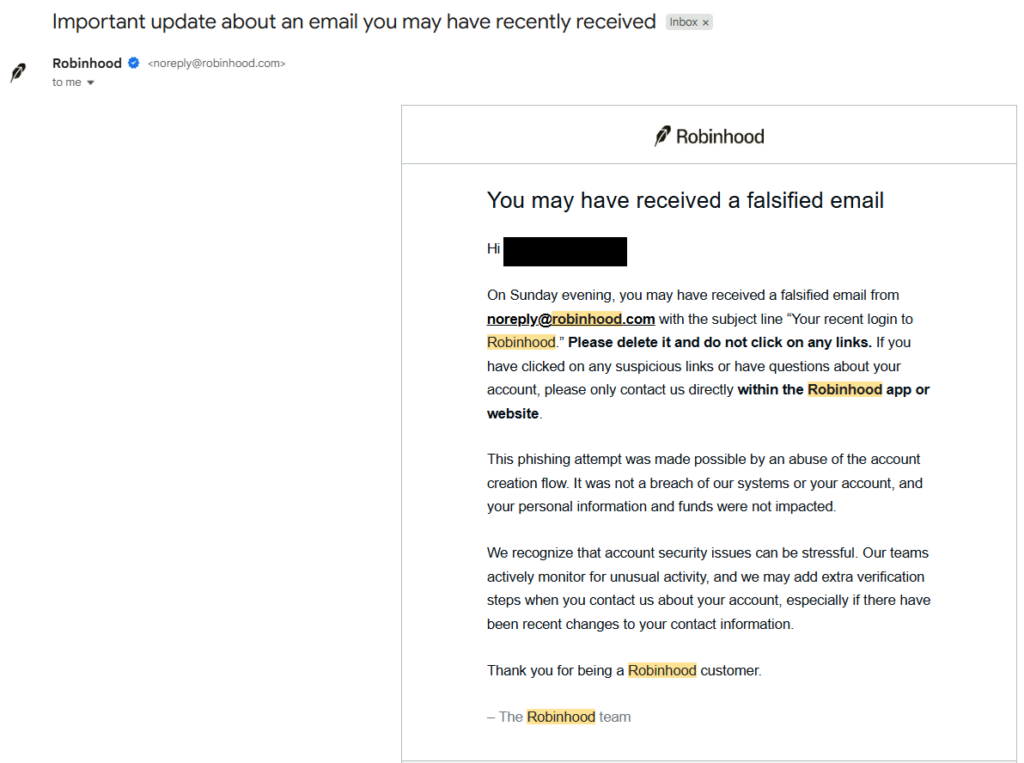
The Anatomy of the Deception
A standard phishing email looks like a forgery. This email was a legitimate Robinhood communication, but it was “poisoned” with a custom HTML overlay.
| Feature | Why it Succeeded |
| Sender Address | [email protected] (100% Legitimate) |
| Security Headers | Passed SPF, DKIM, DMARC, and BIMI (Checkmarks were present) |
| Content | Custom HTML injected into the body to show “Unrecognized Activity” and a malicious “Review Activity” button. |
| Link Destination | The button pointed initially to https://www.googletagmanager[.]com/debug/clearcookies?url=https%3A%2F%2Ftinzio.net%2Fvalidate%3Ftoken%3DeZyCnLCJGab_AsKg3AvPt38wmpWmaLFommDMHgTemACIXvRLtzLyEnjwhvUdvbFD_CDSyBoNOw, which would then redirect to an external phishing domain like robinhood.casevaultreview[.]com/verify. This seemed to be Russian in nature and attempted to trick you into transferring your crypto to an attacker held wallet. |
Key Takeaways for Security Engineers
This incident serves as a stark reminder that even “internal” metadata must be treated as untrusted user input.
- Sanitize Everything: Never assume that “Device Name” or “Browser Type” is safe. If it ends up in an HTML-formatted email (or a dashboard), it must be escaped.
- Trust but Verify Infrastructure: Just because an email comes from a trusted SendGrid tenant doesn’t mean the intent is benign.
- The “Checkmark” Fallacy: We have spent years training users to look for the “verified” icon. This attack proves that a verified sender is only as secure as the weakest input field in their signup flow.
Final Thought
If you received one of these emails, don’t feel bad if you fell for it. Even for a seasoned security professional, an email that originates from a legitimate domain and passes all cryptographic checks is the “gold standard” of trust. When that trust is weaponized, the only defense is a healthy dose of skepticism regarding the destination of the links themselves.
Learning more about phishing? Check out our various GoPhish tutorials like this one!
P.S. if you voluntarily freeze your account.. it may take DAYS for your stuff to unfreeze, just fyi… very tedious. Also – we obviously did not conduct this attack, this is just a technical breakdown of what was done by the adversary.
Proper channel for reporting phishing emails to Robinhood is [email protected].